

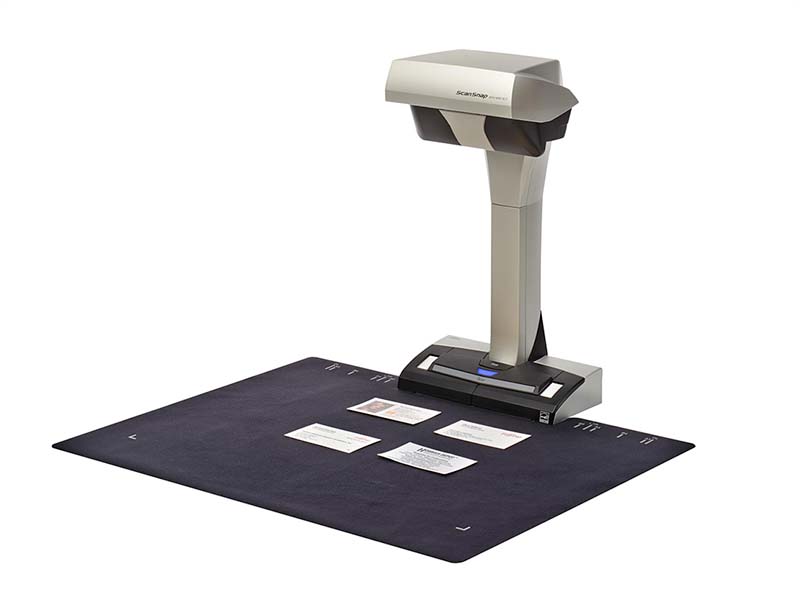

Specifications for Fujitsu Ricoh ScanSnap SV600 Scanner
Scanner Type
Overhead, Simplex
Scanning Speed (A3 Landscape)
Auto mode
3 seconds / page
Normal mode
3 seconds / page (Color / Grayscale: 150 dpi, Monochrome: 300 dpi)
Better mode
3 seconds / page (Color / Grayscale: 200 dpi, Monochrome: 400 dpi)
Best mode
3 seconds / page (Color / Grayscale: 300 dpi, Monochrome: 600 dpi)
Excellent mode
3 seconds / page(Color / Grayscale: 600 dpi, Monochrome: 1,200 dpi)
Scanning Color Mode
Color, Grayscale, Monochrome, Automatic (Color / Grayscale / Monochrome detection)
Image Sensor
Lens reduction optics / Color CCD x 1
Light Source
(White LED + Lens illumination) x 2
Optical Resolution
285 to 218 dpi (Horizontal scanning), 283 to 152 dpi (Vertical scanning)
Document Size
Maximum
432 x 300 mm (17.0 x 11.8 in.)
Minimum
25.4 x 25.4 mm (1 x 1 in.)
Paper Weight (Thickness)
30 mm (1.18 in.) or less
Interface
USB2.0 / USB1.1 (Connector Type: Type-B)
Power Requirements
AC 100 to 240 V, 50/60 Hz
Power Consumption
Operating Mode
20 W or less
Sleep Mode
2.6 W or less
Auto Standby (Off) Mode
0.4 W or less
Operating Environment
Temperature
5 to 35 °C (41 to 95 °F)
Relative Humidity
20 to 80% (Non-condensing)
Environmental Compliance
ENERGY STAR, RoHS
Dimensions (W x D x H)
210 x 156 x 383 mm (8.27 × 6.14 × 15.08 in.)
Weight
3 kg (6.62 lb)
Driver
ScanSnap specific driver
Windows: Does not support TWAIN / ISIS™
macOS: Does not support TWAIN
Software
ScanSnap Home (for PC) (All-in-one document management software/driver)
ScanSnap Manager (Conventional driver)
Kofax Power PDF Standard (Windows)
Kofax Power PDF Standard for Mac (Mac)
ABBYY FineReader for ScanSnap™
Image Processing Functions
Deskew by text on document, Automatic size detection, Automatic rotation, Automatic color detection, Book image correction, Multiple document detection
Included Items
AC cable, AC adapter, USB cable, Safety Precautions, Background Pad, Extenders (x2)












Reviews
There are no reviews yet.